The prettiest problem in the port
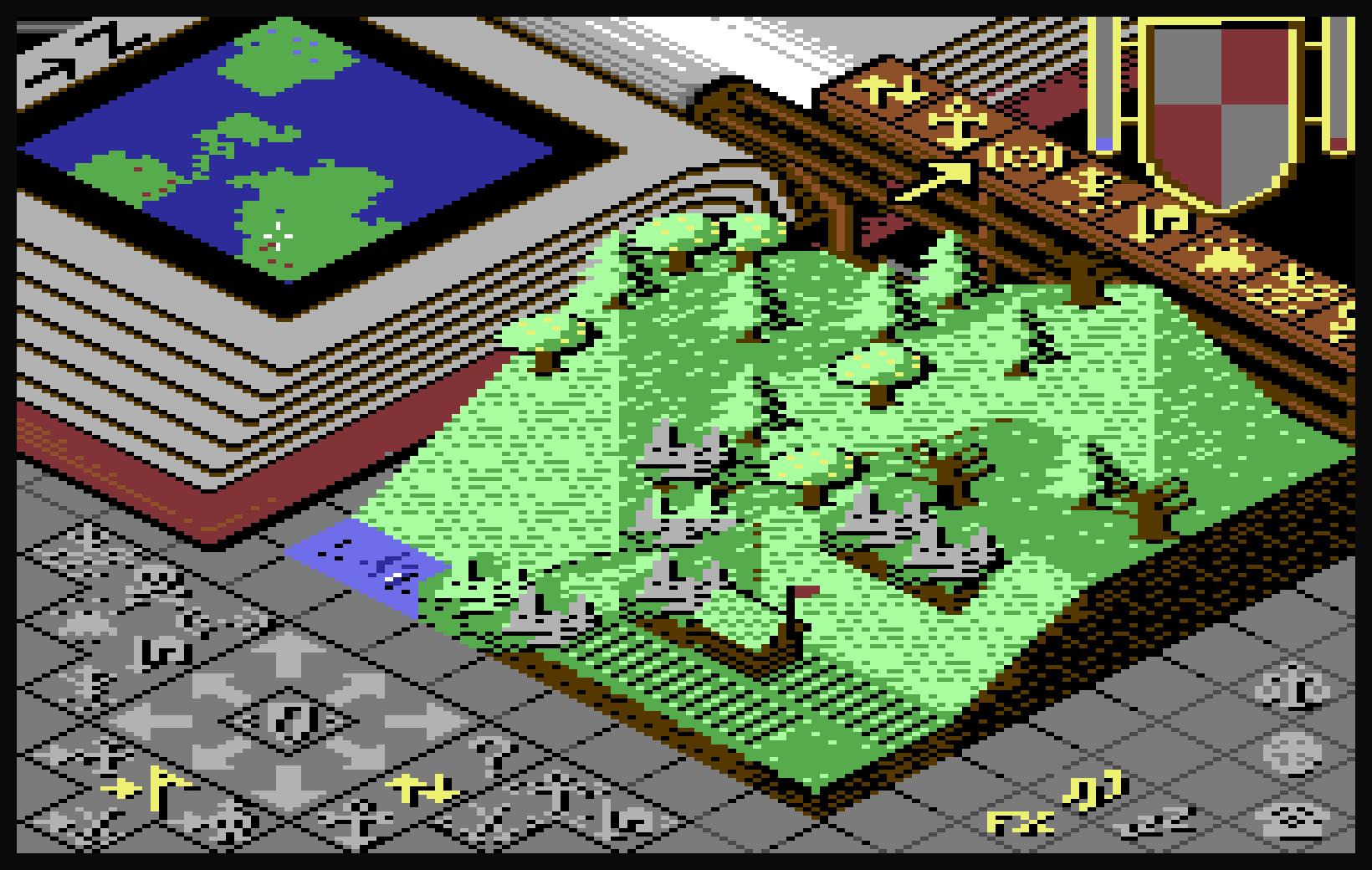
In Populous the world sits in a pit in the middle of the screen, framed by a book on the left, a rail of icons on the right and a grey stone rim all round. Raise a hill high enough and it climbs over the book and up under the rail. On the Amiga that is no problem at all. Every pixel can have any colour, so land in front of the frame is just land in front of the frame.
On the C64 it was the hardest graphics problem in the whole port. Harder than the scrolling, the walkers or the cartridge banking. This is how I solved it, with real pictures from the game.
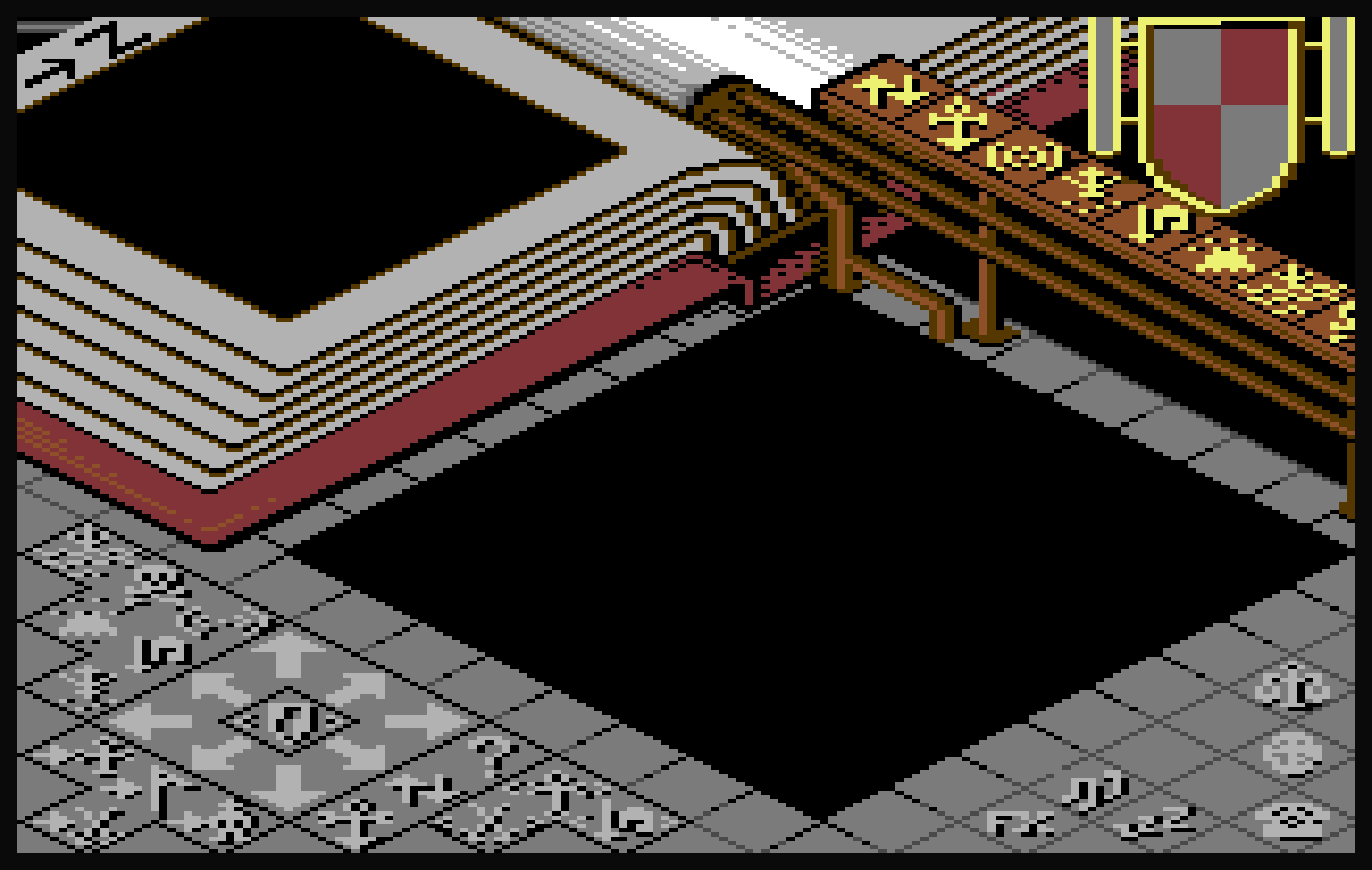 The empty game screen. My multicolour bitmap, drawn by hand, and the foundation for everything below
It starts with the frame
I drew the game screen myself as a multicolour bitmap, knowing that land would grow into it. That changes how you paint. Every block the land can reach had to be planned: how many colours it uses, which of them can give way without the picture falling apart, and where the lines run so a hill across them still reads as a hill in front of a book.
So the frame is simpler and cleaner than the Amiga original, on purpose. Flat areas, clear shapes, few colours per block along the edge, no dithering where the land meets it. As a pure multicolour picture I would have drawn it differently: more shading in the book, softer stone, more colour in the rail. A picture that only has to look good on its own is easy. One that has to survive any landscape the player throws at it is a different job, and it took many rounds, sometimes one pixel at a time.
The game uses the picture exactly as drawn: the C64 reads the frame's colours straight from that bitmap in cartridge ROM.
Black and three colours
The limit, in plain terms. The screen is 40 x 25 chars, 1000 blocks of 8 x 8 pixels. In multicolour mode each block is 4 x 8 double-wide pixels and shows black plus three colours. Black is shared by the whole screen. Two colours come from screen memory and one from colour memory, all three free per block. Three. Not one more.
The landscape tiles already use all three: two ground colours plus one for detail, water or a team flag. So the moment land rises into the frame, land and frame want the same three slots. Somebody has to lose.
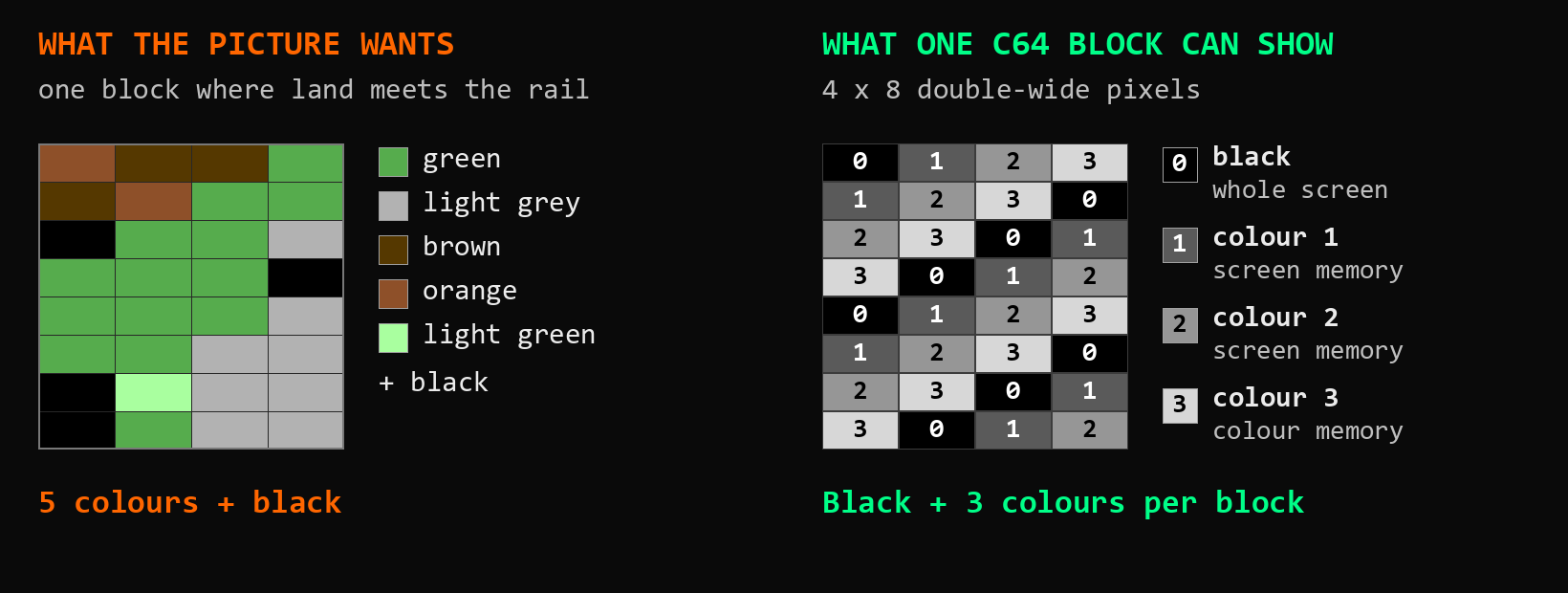 A real block from the game, where grass and a rock meet the rail: five colours want in, three get a seat
1000 chars, each with a job
The first step was not code, it was a map. I went through all 1000 chars of the screen and gave each one a job: who draws it, and what happens when two things want it at once.
Most of the screen is easy. The world itself, in the middle, where the land owns every pixel. Big parts of the frame the land never reaches. The radar, the icons, the shield and its bars. And a handful of chars the land shares with the radar or the shield, with a simpler rule of their own.
That leaves the interesting part: the edge chars, a bit over 300 of them, where the land can rise into the frame art. I sorted them into classes, close to 40 in the end. A class is an exact set of frame colours in an exact kind of place: the grey rim, the red book cover, the pages with their brown lines, the orange and brown rail, the dark grey edge of the right rim, the white shine along the top, the small joints where book, rail and rim meet, and the chars by the shield. Some classes are big. Some are a single char, because that one char is unlike anything else on the screen.
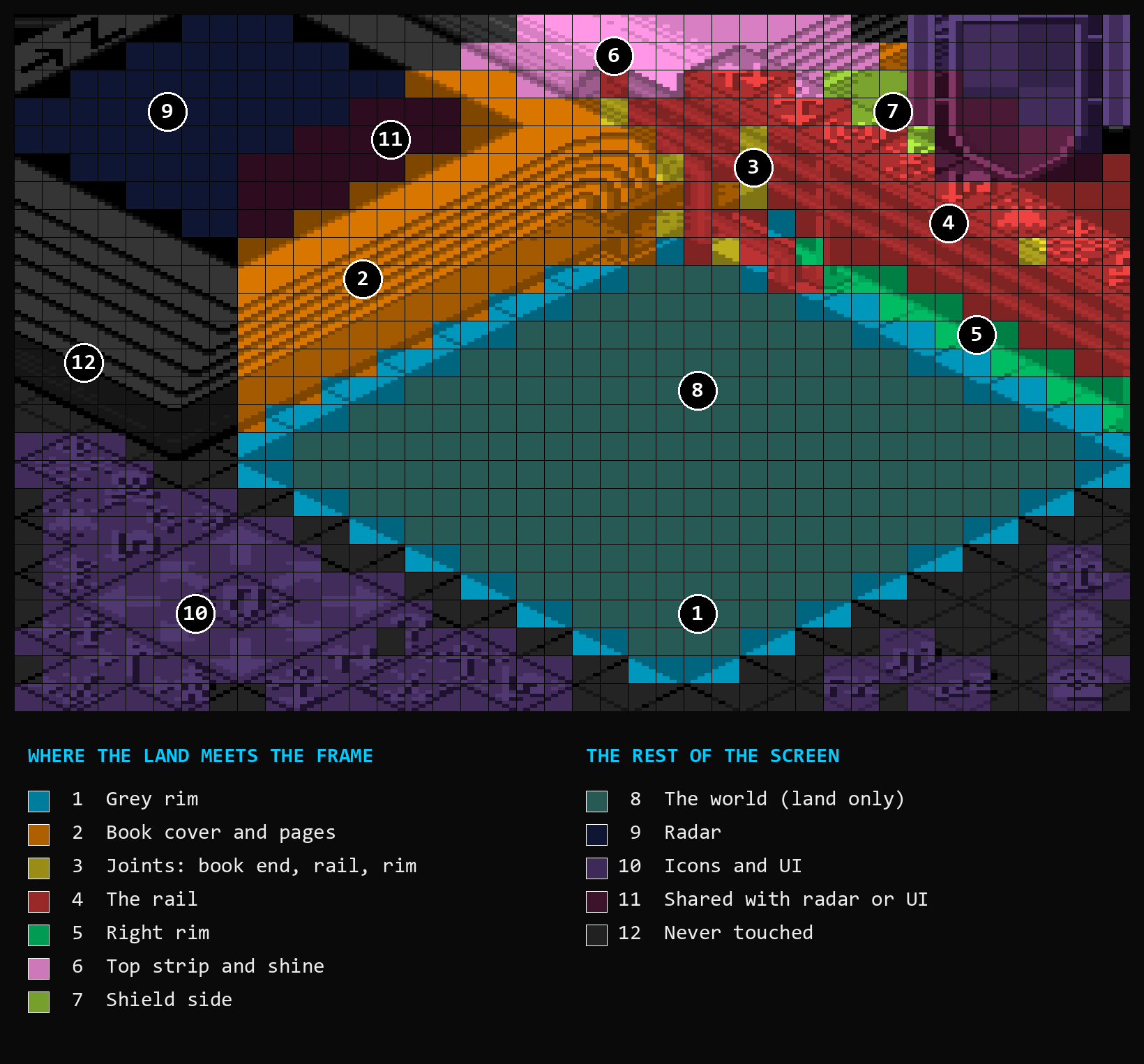 The map. Numbers 1 to 7 are the edge chars where land and frame meet; 8 to 12 are everything else. Click to see it full size
Every edge char is in one of three states, worked out on every redraw. Untouched: no land, so it shows my frame as drawn. Completely hidden: all land. Both visible: part land, part frame. Only that last one is a fight, and only that one needs a rule.
What happens if you do nothing clever
Here is why the rules matter. A grassland world after a long stretch of play: a forest with rocks, a town and a bit of sea, and two hills raised the way a player would, so the trees climb right up into the book and under the rail. First the obvious way: where land and frame meet, the land gets the block's colours, and a frame pixel keeps its colour only if the land happens to use it too. Every other frame pixel goes black.
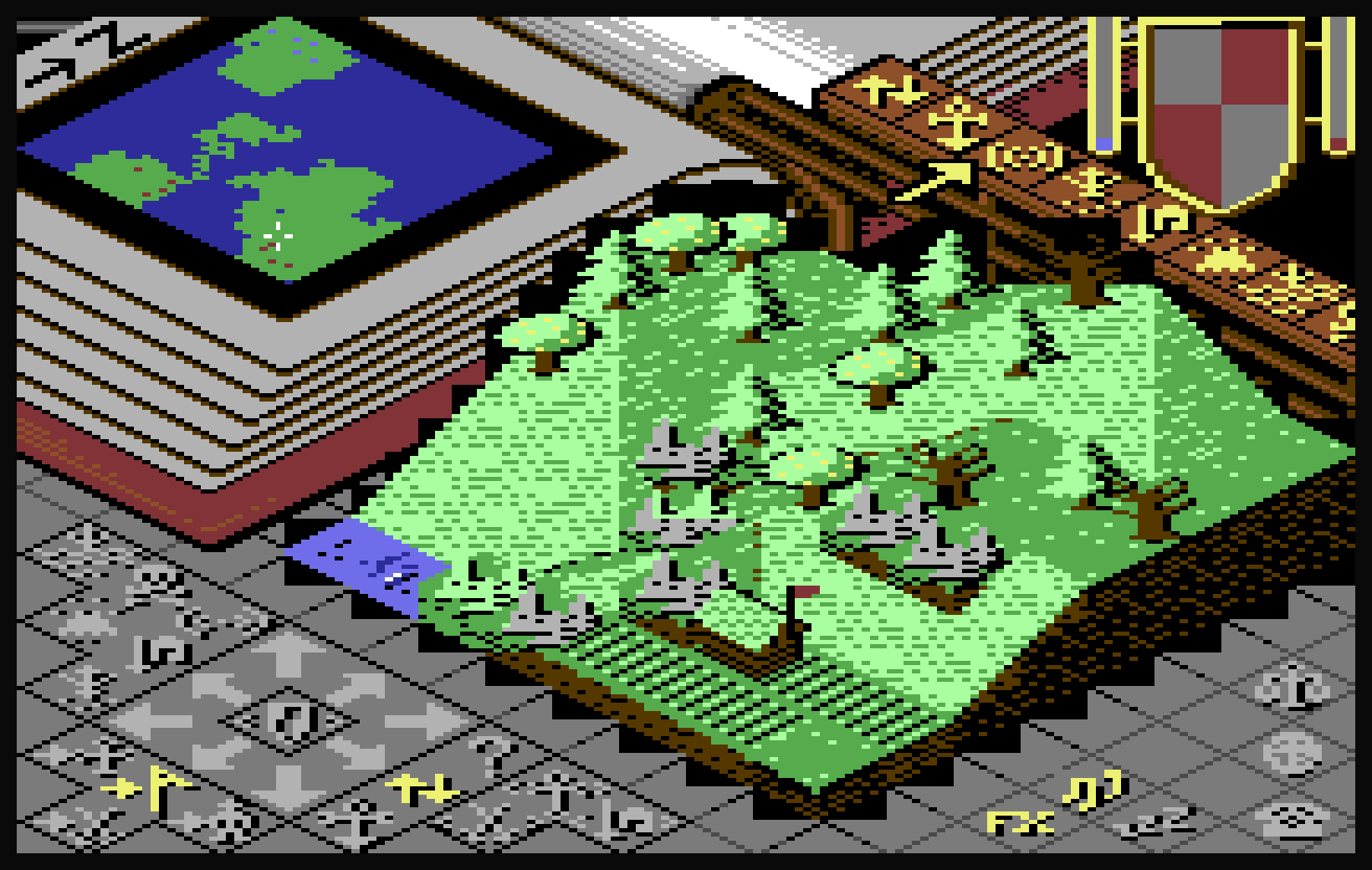 Without: the land simply takes every block it touches
 With the colour cut: same world, same view, same land
Black notches all over the frame. The book pages break into black blocks wherever a tree comes near, the rail turns into black holes above the forest, and the front rim gets a black staircase all along the land. With the colour cut the trees stand in front of the book and under the rail, and the frame is still the frame.
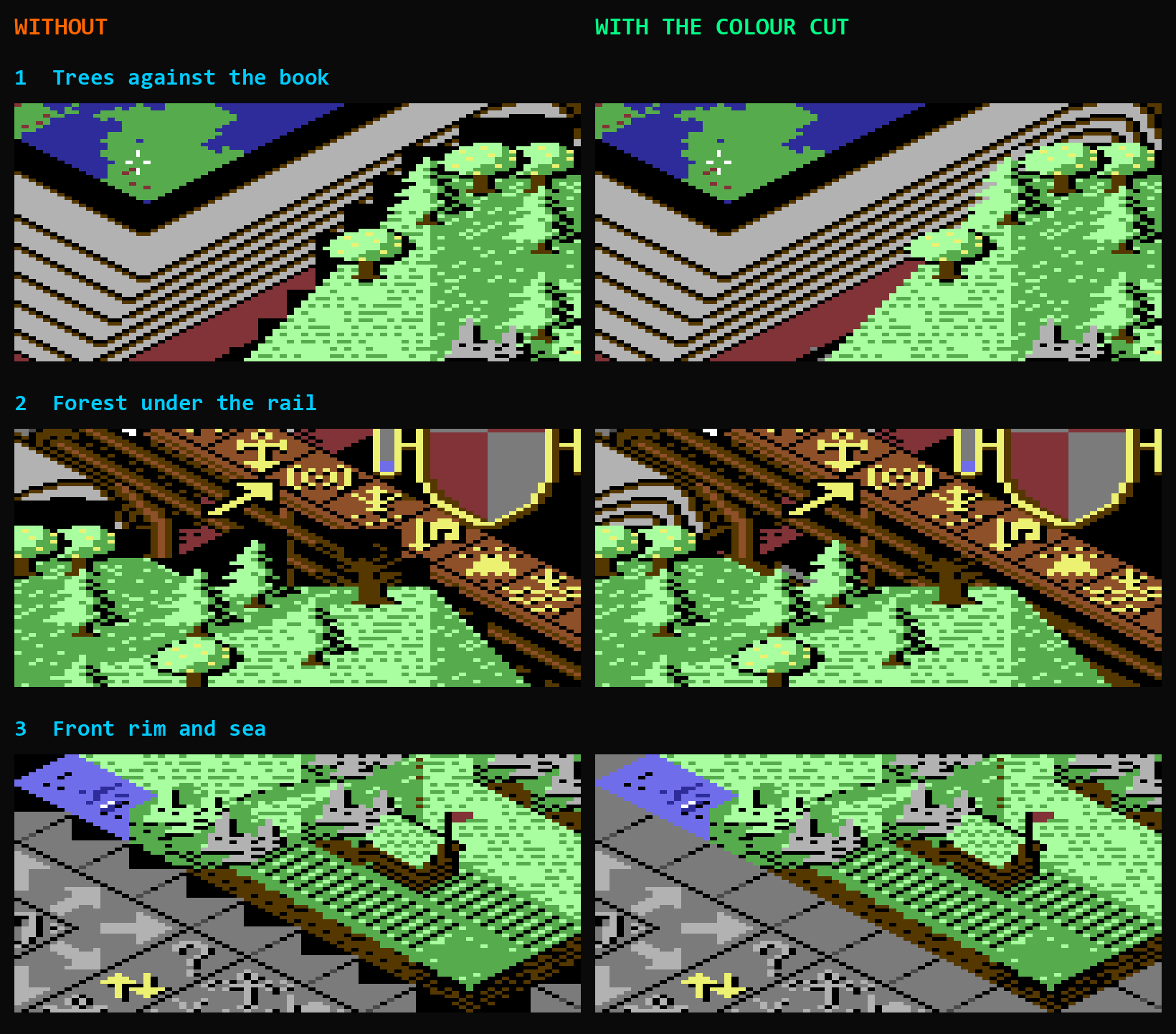 The worst spots up close. Left without, right with the colour cut
The idea: decide once, on the finished picture
My first attempts decided item by item while the land was being drawn: a tile here, a tree there, each one fighting the frame for its block. That is where most of the ugliness came from. An early item could steal a colour that a later one would cover anyway.
The colour cut turns that around. All the land is drawn first, while a mask records which pixels it covered. Then each conflict char is decided once, on the finished picture, using only the pixels you can actually see: land where the land is, my bitmap art everywhere else. If the colours fit in black plus three, they all stay and only need the right slot. If not, colours give way one at a time, in an order set by the char's class, until they fit.
Three rules hold everywhere. Tiny colours go first: one or two visible pixels go before anything else, a tiny land colour back into the land, a tiny frame colour into the frame. A dropped colour lands on a colour that survives, never on one that drops later, so no pixel moves twice. A land colour merges within the land: light green into green, never the desert's orange sand into a brown page line just because both are browns. Black is only a target for brown and dark grey, and only as a last resort.
Then each class adds its own rule, 26 in all. The grey rim never gives while it shows. On the rail, orange goes first and becomes brown, and brown never gives. On the book, the light grey page never gives, and a brown page line fades into the page instead of ending in a black stub. Team flags only change into colours that still read as their team: light blue into blue or cyan, red into light red, orange or purple.
One char, step by step
Here it is on one char from another corner of the same world, left exactly as the game grew it: a rock on the grass, right where the grass meets the rail. Five colours plus black want into a block that can show three.
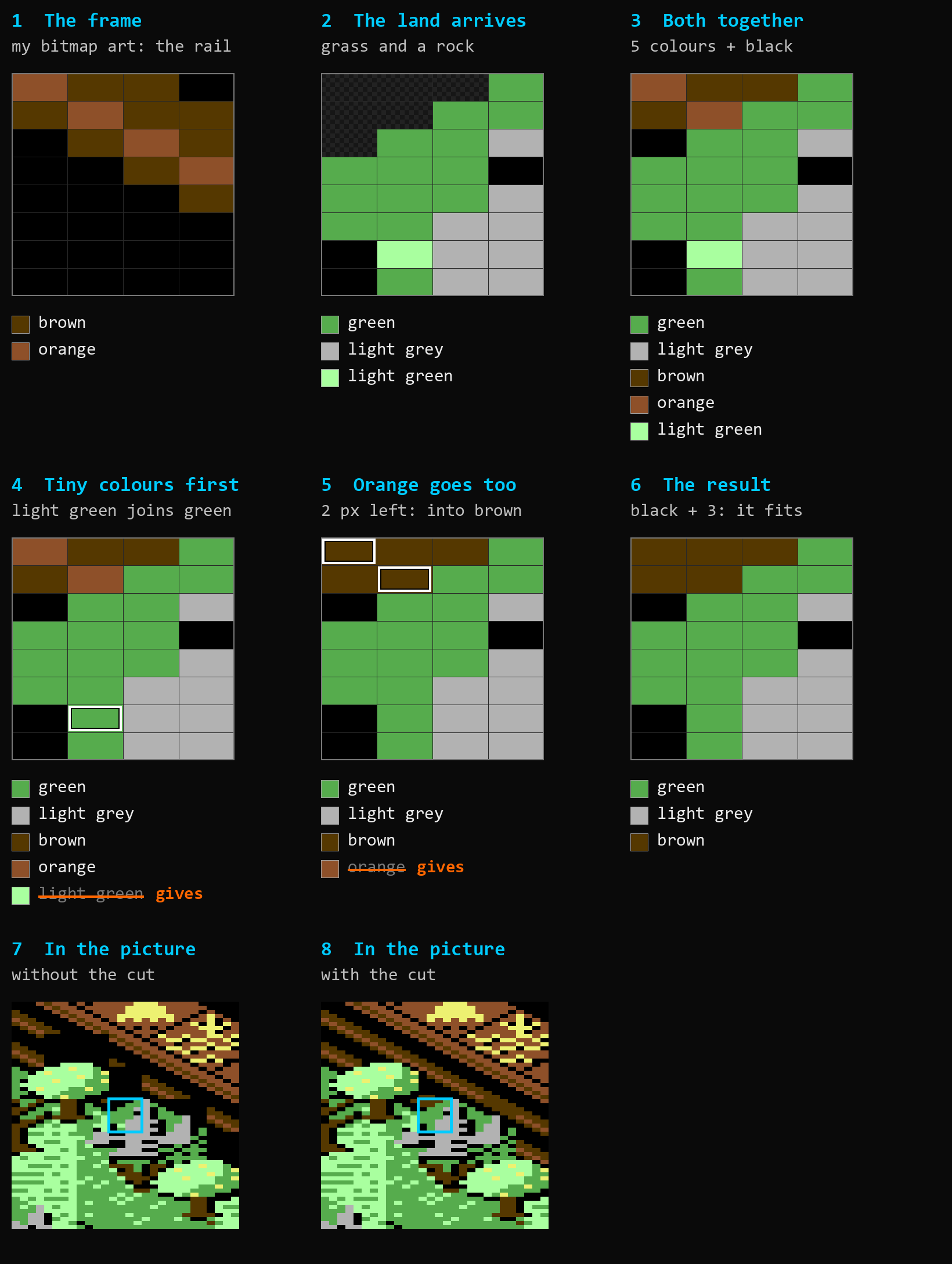 The rail rule, worked through on one real char. Click to see it full size
1. The frame: my rail, brown with an orange stripe. 2. The land arrives and covers most of it: green grass, the light grey of a rock, and a single pixel of light green. 3. Together that is green, light grey, brown, orange and light green. Two too many.
4. Tiny colours go first. The lone light green pixel is land, so it goes to the closest land colour, green. 5. Still one too many. The orange stripe is down to two pixels in this char, so it goes next, and it goes exactly where the rail wants it: into brown, the colour the rail is built on. 6. Green, light grey, brown, plus black. It fits. The grass keeps its green, the rock keeps its grey, the rail is still a rail. 7 and 8 show the char in the picture: without the cut a black hole in the rail, with the cut you would never know there was a fight.
The order is the whole point. On the rail, brown is what makes it a rail, so brown never gives, and the orange stripe is the highlight it can afford to lose. On the rim it is the grey, on the book the light grey page. That is what the 26 rules are: one decision per part of the frame about what matters most, applied to every char of that class on every landscape.
Edge cases, or where my first rules were wrong
The first full set of rules ran. Then came the looking: many, many screenshots across all four landscapes, every edge class with every kind of land, town, tree, rock, flag and sea against it. That found the places where a rule did exactly what it said and still looked wrong. Three of them, each shown three ways: without edge handling, with my first rules, and with the final ones.
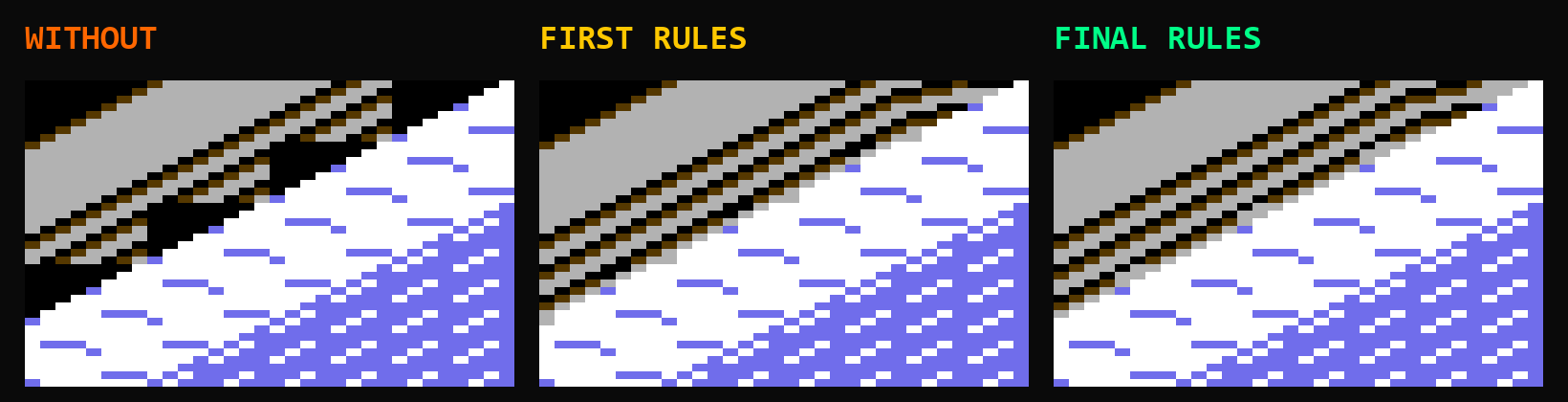 The book pages against snow. The first rule sent the brown page line to black, and the final one fades it into the page
The page lines. When the pages have to give a colour, the brown line goes. My first rule sent it to black, the only safe colour I had allowed brown. The pages stayed whole, but every line ended in a black stub where it met the land. Now the line fades into the page: brown goes to orange if the land has orange, otherwise into the page's light grey, and only to black if neither is left. The book just runs behind the hill.
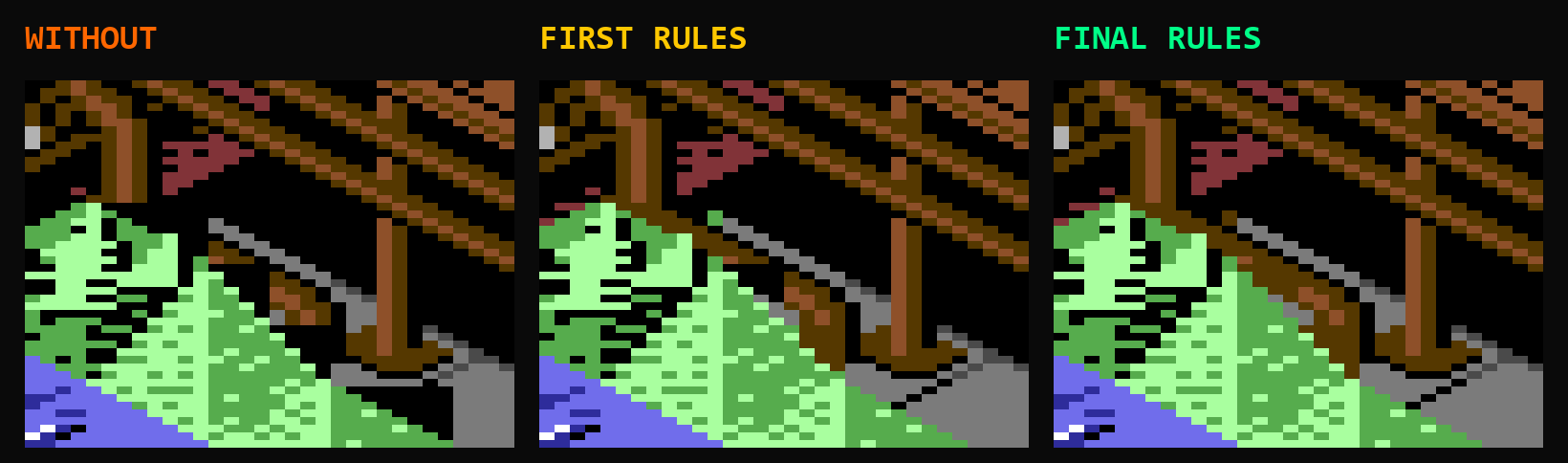 The rail meeting the rim, next to rocks on grass. With the first rules the post simply stopped short
The rail meets the rim. Where the rail runs into the stone rim there are three frame colours: orange, brown and grey. My first rule made brown give second, straight to black, so the foot of the rail post went black and the rail looked cut short. Now the land gives before brown does, and if brown ever has to go, it goes to dark grey or grey, never black. The post stands on the rim again.
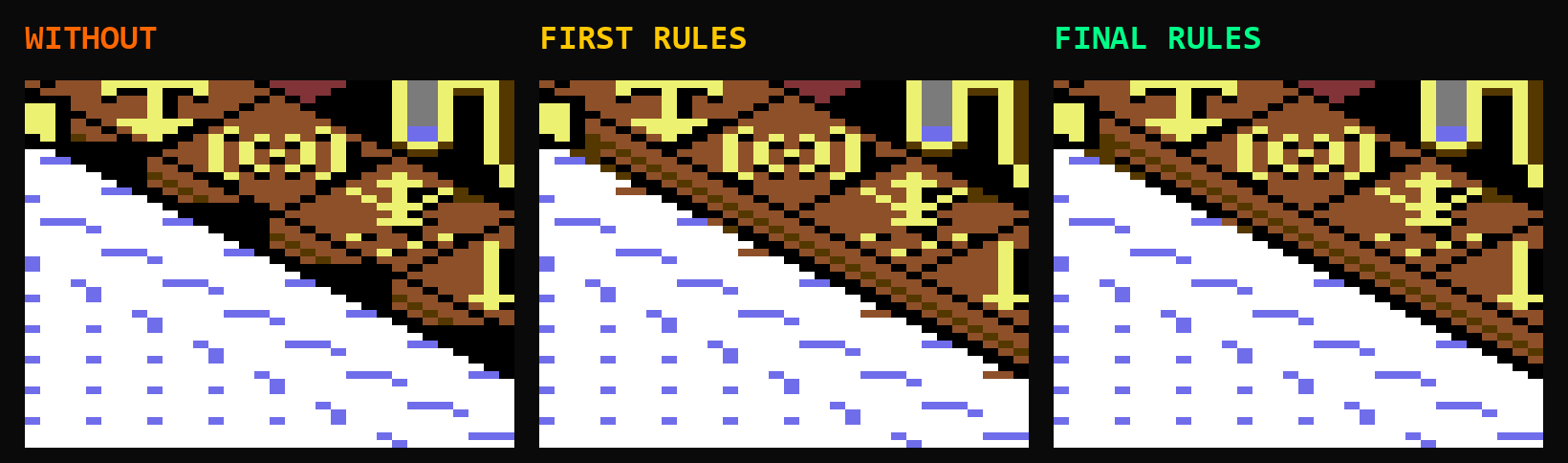 Snow under the rail. The orange saw-tooth was made of tiny snow specks
The snow saw-tooth. A sneaky one. On the snow world the land under the rail had small specks of light blue, one or two pixels each. Tiny colours go first, which is right, but my first rule merged them into the closest colour in the char, and that was the rail's orange. Result: an orange saw-tooth along the whole rail. Now a tiny land colour goes back into the land first. Snow specks become snow.
None of these were bugs in the code. The code did exactly what the rules said. They were judgement calls I got wrong on paper, and the only way to find them was to look. A lot.
The cost, and getting it back
None of this is free. Every conflict char now gets counted, ranked and repainted after the land is drawn, on a 1 MHz machine. The first working version made a full redraw of the close-up 59% slower than the old rules, and a partial redraw, the kind you get when you sculpt, 31% slower.
Then came the speed work. Most conflict chars do not actually need a cut: their colours already fit, like the grey rim against the sea. The vast majority, in fact, and they take a fast path that only counts, places and writes. Everything that can be worked out in advance is: the tables and the frame's pixel planes for every edge char sit precalculated in cartridge ROM, in banks of their own, and the cut needs no RAM the game did not already have. Every speed-up had to leave the picture exactly as it was, down to the last pixel, or it did not go in.
Where it stands now: a full redraw costs 38% more than with the old rules, and a partial redraw 23% more. The close-up is built on a hidden screen and swapped in when it is done, so you never see a half-made picture, and the music keeps playing.
Getting it exactly right
A rule set like this is easy to get almost right, and almost right shows up as one wrong pixel, in one block, on one world, an hour into a game. So nothing went in until the C64 drew every rule exactly the way I had designed it, on every landscape, down to the last pixel.
With my earlier rules the rim lost its grey all over the place and the frame was full of black notches. With the colour cut they are gone.
Why bother
Because this is the bit people look at. The edge of the pit is where a C64 Populous looks like a C64 version, or like the game. It is a thousand small decisions about colour, and you are not supposed to see any of them. If you play and never notice that land and frame fight over every block they share, it worked ;)